Inventory & Warehouse Management System
Inventory management software for a warehouse team: stock per location and bin, barcode scanning, goods receipt, picking, transfers, cycle counts, batch and expiry tracking, and reorder suggestions.
Project facts
- Project type
- Inventory & warehouse system
- Category
- Business systems
- Industry
- Wholesale, distribution & warehousing
- Technology stack
- Next.js
- React
- TypeScript
- PostgreSQL
- Prisma
- Flutter
- BullMQ
- REST API

Overview
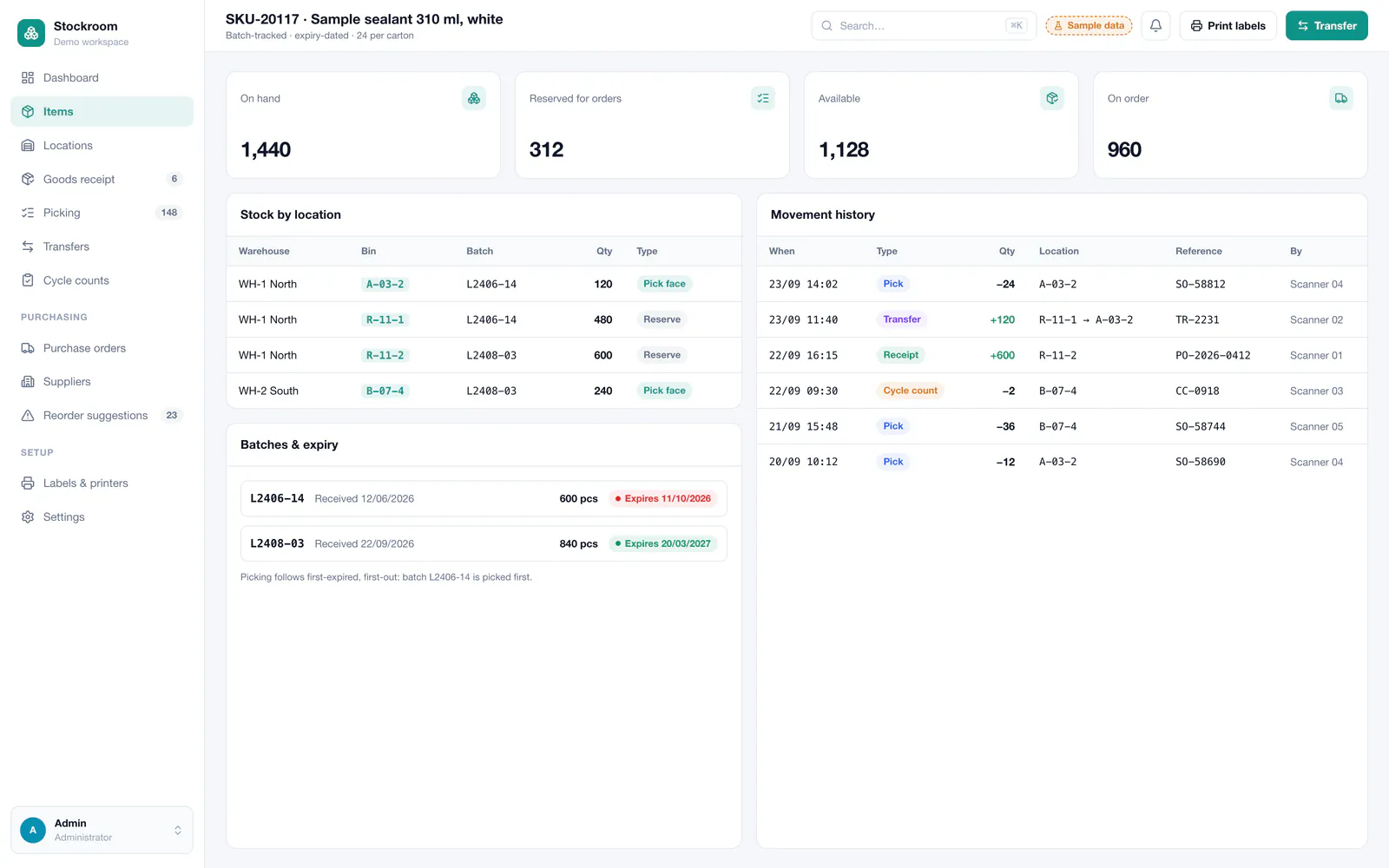
This demonstration project shows an inventory and warehouse management system for a distributor that keeps stock in two warehouses and sells through a webshop and a trade counter. Every item has a place — warehouse, zone, rack and bin — and every movement, whether a receipt, pick, transfer, count or correction, is recorded with who did it and when. The stock figure on screen is the stock on the shelf.
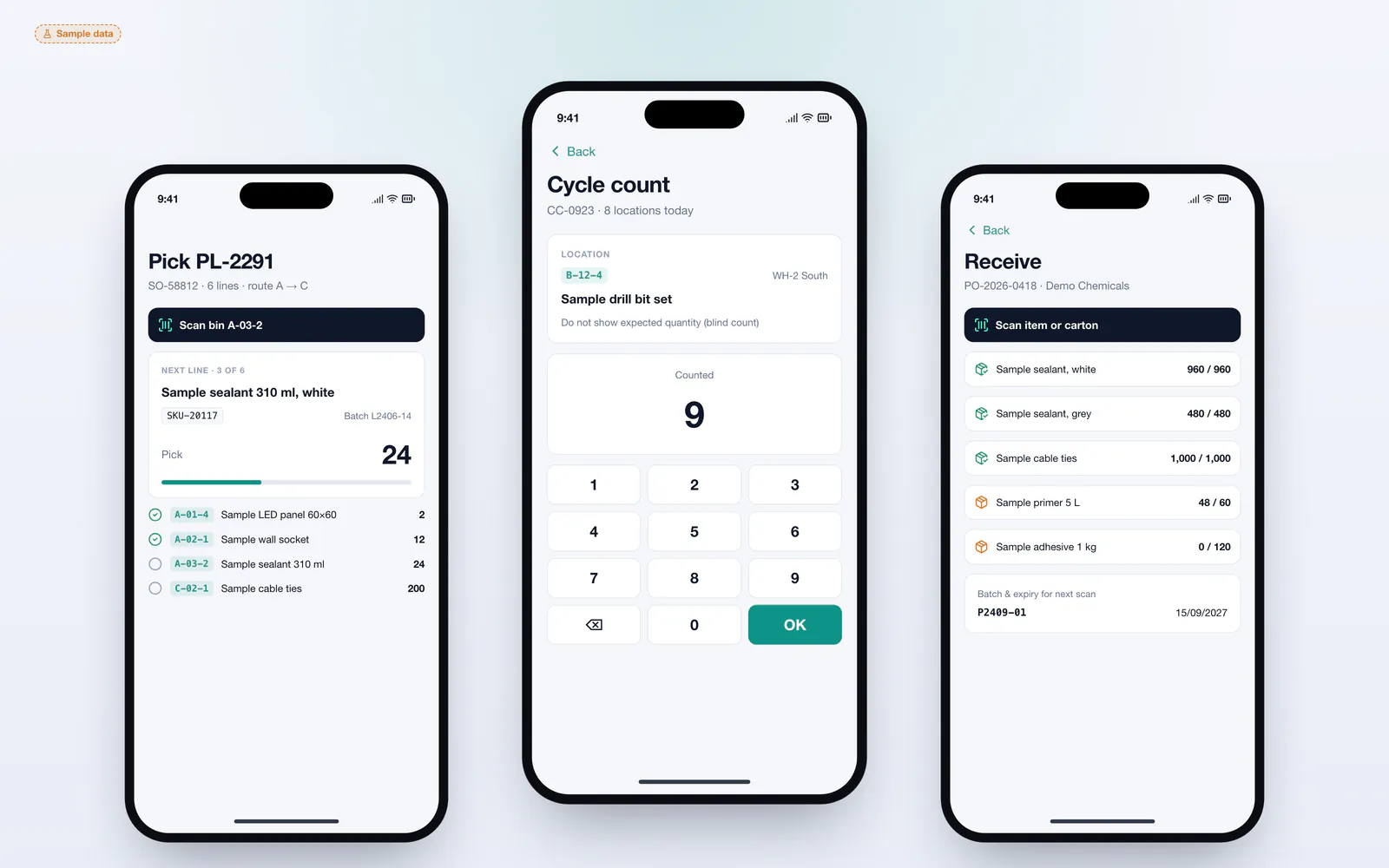
Warehouse staff work from handheld scanners: they receive deliveries against purchase orders, pick orders by scanning bins and products, and count locations without closing the warehouse. The office sees stock value, slow movers, items below their reorder point and everything that is on its way.
The challenge
Stock kept in spreadsheets, or in the stock tab of an accounting or shop package, is rarely right. Items are sold that are not on the shelf, others sit forgotten in the wrong bin, and the yearly stocktake closes the warehouse for a day and still leaves differences. Without batch numbers and expiry dates, recalls and date-sensitive goods become guesswork, and reordering depends on someone walking the aisles with a notepad.
The solution
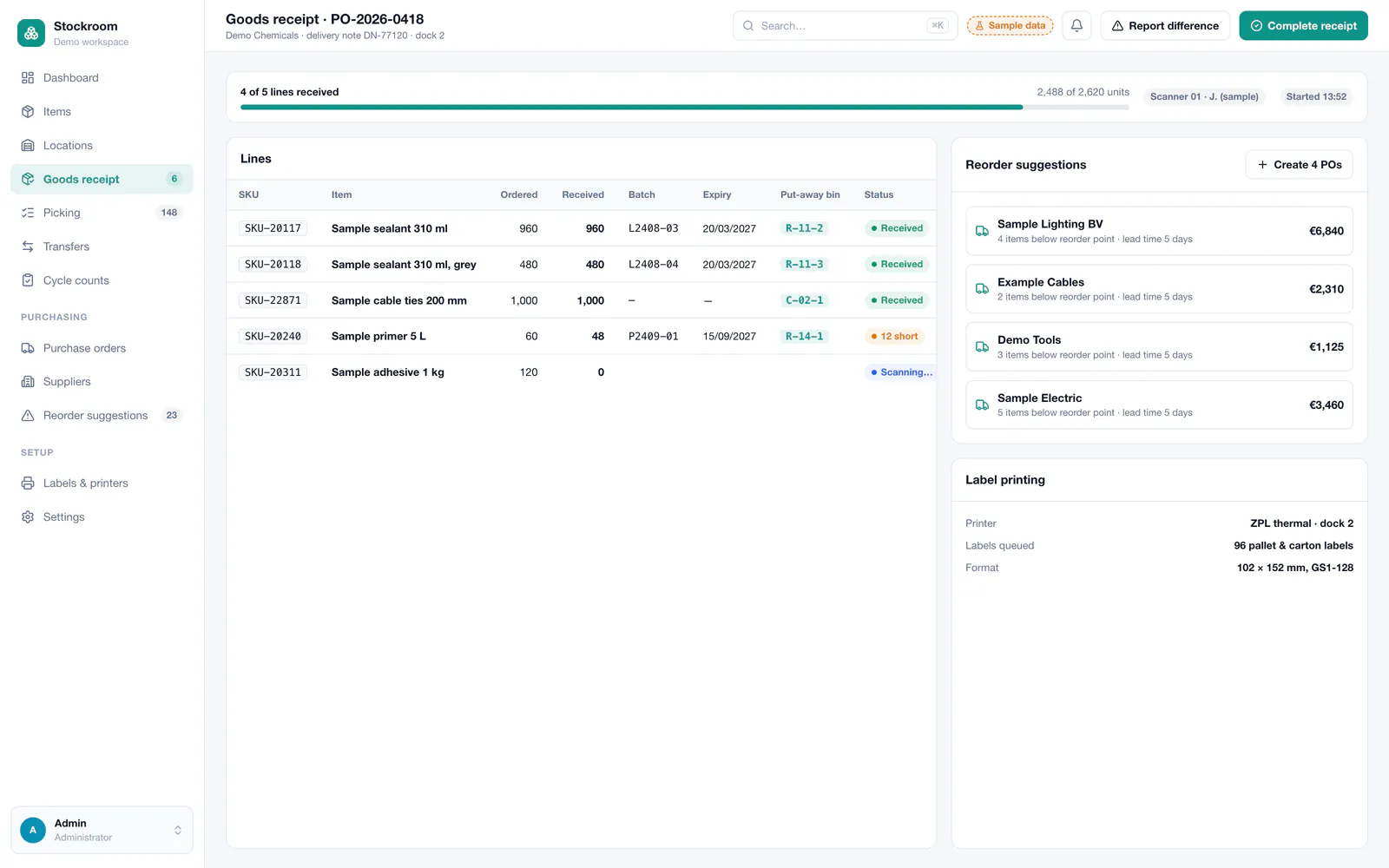
The concept treats every change in stock as a movement with a source, a destination and a reason, recorded the moment it happens by scanning. Purchase orders are received line by line with batch numbers and expiry dates; sales orders become pick lists sorted by walking route; transfers move stock between bins or warehouses; and cycle counts check a few locations every day instead of closing for a full stocktake. Reorder points and supplier lead times turn into suggested purchase orders, and the webshop reads available stock through an API.
Key features
- Stock per warehouse, zone, rack and bin location
- Barcode and QR scanning on Android handhelds
- Goods receipt against purchase orders with batch and expiry
- Pick lists sorted by walking route, confirmed by scanning
- Transfers between bins and warehouses
- Cycle counts without closing the warehouse
- Reorder points and suggested purchase orders
- Stock value, slow movers and full movement history
Who it is for
- Wholesalers and distributors with one or more warehouses
- Webshops that have outgrown the stock tab of their shop platform
- Businesses handling batches, serial numbers or expiry dates
- Teams still doing a yearly stocktake on paper
Technical approach
A Next.js application for the office, with PostgreSQL through Prisma as the single stock ledger: quantities are derived from an append-only movements table, and database constraints protect each location's balance so two scanners cannot take the same unit twice. The handheld app is built with Flutter for Android scanners and queues scans when the warehouse Wi-Fi drops. BullMQ runs reorder calculations and low-stock alerts; labels are printed as ZPL on thermal printers; and a REST API exposes stock to the webshop and accepts its orders.
- Frontend
- Database
- Mobile
- Integrations
- Barcode & QR scannersZPL label printersWebshop APIExcel / CSVSMTP
Screens
Main screens
Admin interface
Mobile & responsive views
Services behind this project
The work in this case study maps onto these services. Each page explains scope, process and what you receive.
Related projects
All projects Business systemsCRM system
Custom CRM System
A CRM shaped around one sales process: lead capture from the website and WhatsApp, a visual pipeline, contact timelines, follow-up tasks, quotes and a sales dashboard.
- Next.js
- React
- TypeScript
- PostgreSQL
- Prisma
- +2
 AutomotiveGarage management software
Garage Management System
Workshop software for car repair garages: a live workshop board, repair orders with parts and labour, vehicle history, online appointments, WhatsApp updates to customers and invoicing.
- Next.js
- React
- TypeScript
- PostgreSQL
- Prisma
- +3
 Desktop softwareWindows desktop application
Windows Desktop Business Application
A Windows desktop application for running a small business from the office PC: customers, records, quotes and invoices, local printing, reports and backups — fully offline, with optional sync to a server.
- Electron
- React
- TypeScript
- SQLite
- Node.js
- +2
Questions about this type of project
Is this system used by a real warehouse?
No. It is a demonstration project with sample products, locations and orders. It shows how Saad builds custom inventory and warehouse management software.
Can the stock be connected to our webshop?
Yes. The system exposes available stock per product through an API and can receive orders from the shop, so what customers see online follows what is on the shelf. Common shop platforms are connected through their official APIs.
Do we need special scanners to start?
No. The handheld app runs on Android devices with a built-in scanner, and a phone camera is enough for lower volumes. Labels print on standard thermal label printers.
Want a similar project?
Tell Saad what you need. You get a clear scope, a phased plan and direct contact with the developer who builds it — no middlemen.
Direct, clear communication
You talk directly to the engineer writing the code — no sales intermediaries, no vague delivery dates.
Fully custom solutions
No ready-made WordPress themes or copied code — every line is written to fit your business's exact requirements and scale.
From idea to launch
Help shaping the specification and turning a rough concept into a real, usable digital product.
The request form opens with this type of project already selected.